A Major Xogot Update Just Hit the App Store
This release brings our new Xogot Modeler to iPad and iPhone, brings a huge Godot 4.7 upgrade, and gives Xogot full support for Terrain3D.
Build 3D Worlds with Xogot Modeler
The biggest feature landing in today's release is the Xogot Modeler, our touch-first tools for building and editing 3D geometry directly inside Xogot.
Features like the Modeler are a big part of why we wanted to bring Godot to the iPad in the first place. Level design is an inherently spatial and hands-on process, and a touchscreen gives you a direct way to work with your scene.
Inspired by tools like Unity's ProBuilder, Xogot Modeler lets you greybox levels, blockout environments, and create simple props without constantly switching between Xogot and an external modeling application.
Start with a primitive
Start with configurable primitives or draw custom shapes, then refine your geometry using familiar vertex, edge, and face editing tools. You can extrude geometry, build along Bézier paths, edit UVs, assign materials and colors, add collisions and triggers, and turn pieces of your level into reusable parts.
Drawing a Bézier path to quickly greybox a tunnel
Combined with the Asset Browser and Asset Placer we introduced earlier this year, Xogot Modeler makes it possible to do much more of the 3D level-building process without leaving Xogot.
Mesh painting
And while Xogot Modeler adds new editing capabilities to Xogot, the projects it produces are still Godot projects. Xogot Modeler creates standard Godot meshes and collision nodes, with additional metadata that lets Xogot preserve the editable geometry. You can move the same project between Xogot and desktop Godot, and you can even strip the Xogot Modeler metadata if you no longer need it.
Miguel recently wrote a blog post that takes a much deeper dive into Xogot Modeler, including examples of complete environments built entirely from editable geometry, extrusion workflows, Bézier paths, and more:
The Power of Godot 4.7
This release also updates our underlying engine to Godot 4.7.
Godot 4.7 brings improvements across rendering, mobile input, user interfaces, 2D and 3D development, animation, controllers, and more.
Some of the changes we are particularly excited about for Xogot users include:
- Offset transforms for Control nodes, allowing UI elements to be translated, rotated, and scaled for animations and interactions without disrupting their container-managed layout.
Offset transforms for Control nodes
- Built-in VirtualJoystick support, making it much easier to add configurable touchscreen movement controls directly to your Godot project.
Save the Axolotl with Godot 4.7's built-in VirtualJoystick node
DrawableTexture2Dproviding a much simpler way to draw and composite textures at runtime for things like painting, decals, reveal effects, scratch effects, and fog of war.
DrawableTexture2D
AreaLight3Dnode adding rectangular real-time light sources for things like screens, signs, windows, and overhead light panels.- Improved controller support, including Godot's move to SDL3 for game controllers on iOS.
- A wide range of additional rendering, physics, animation, particle, material, and 2D improvements.
You can learn more in our Xogot is moving to Godot 4.7 post.
As with any Godot engine upgrade, we recommend making sure important projects are backed up or committed to version control before opening them in the new release.
Terrain3D Comes to Xogot
One of our most requested features since launching Xogot on iPad has been support for Terrain3D.
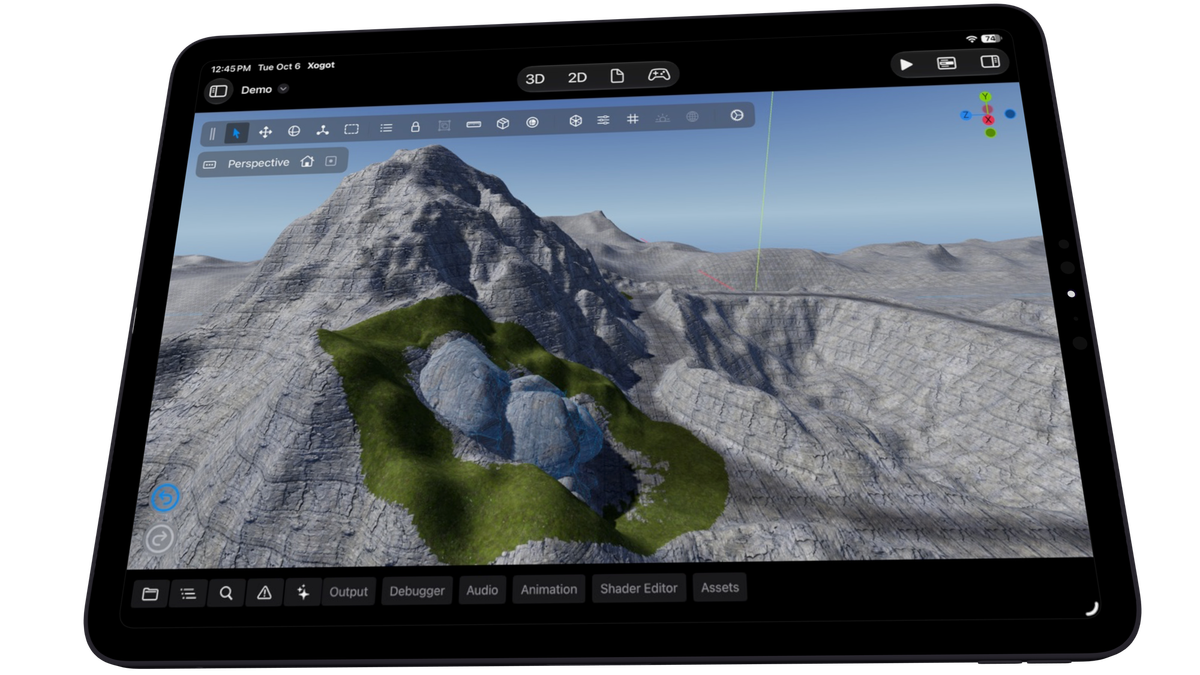
Terrain3D is a high-performance, editable terrain system for Godot 4. It provides tools for building large 3D environments, including terrain sculpting, texture painting, holes, foliage instancing, multiple levels of detail, heightmap importing, and more.
Terrain3D in all its iPad glory
Terrain3D now works directly inside the Xogot editor, and Terrain3D projects work when running your game in Xogot as well.
We have also added Terrain3D to Xogot's Asset Library, so you can find it and install it into your project directly from Xogot.
For developers building larger outdoor 3D environments, this opens up an entirely new category of projects that can now be created and edited on iPad and iPhone.
An Updated Learning Center
We have also given the Xogot Learning Center a significant update alongside the move to Godot 4.7.
All of the projects in the Learning Center have now been updated for Godot 4.7. Where appropriate, projects have updated to use Godot's new built-in VirtualJoystick support, so the examples you learn from reflect the latest Godot APIs and recommended mobile workflows.
We have also added several new videos and tutorials covering Xogot Modeler, Asset Placer and Asset Browser, and 2D and 3D game development concepts.
Xogot 1.7.2 is available today.
As always, we can't wait to see what you build with Xogot, and we especially want to hear your feedback as you start using Xogot Modeler, Terrain3D and the rest of these many updates.