

Better Asset Placing and More Accessible Pricing: Xogot 1.6.4
Our latest App Store release brings a wide range of improvements to Xogot on iPad and iPhone. The two biggest changes are expanded regional pricing that makes Xogot significantly more affordable in several markets, and a new Asset Placer that makes building 3D scenes in Xogot much faster.
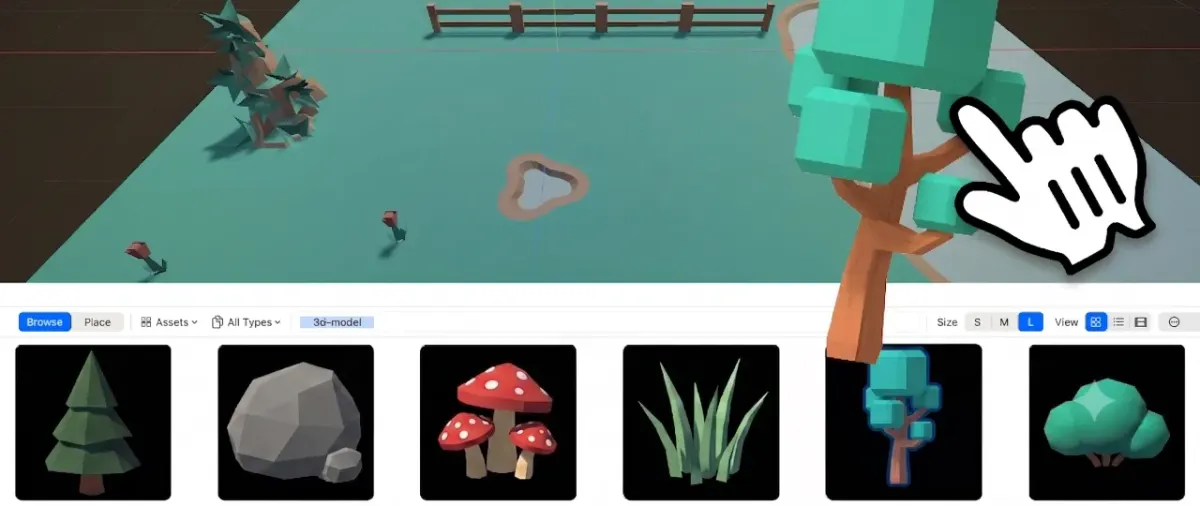
Painting trees with Xogot's new Asset Placer
Lower prices in many markets
We've heard from users around the world who were excited about Xogot, but who told us our pricing did not fit their local market.
Until now, we had adjusted regional pricing for some major markets, but many countries were still using default pricing. With Xogot 1.6.4, we have changed how we determine prices worldwide and are now applying adjusted pricing across all geographies.
As a result, Xogot is now significantly more affordable in many countries, with reductions of more than 50% in markets like Brazil, India, Turkey, and Thailand.
Thank you to everyone who took the time to share thoughtful feedback. We want Xogot to be accessible to more people building with Godot on iPad and iPhone, and this release is an important step in that direction.
New: Asset Placement made easy.
When building 3D scenes, a lot of time can disappear into repetitive work: place a mesh, rotate it, scale it, add collision, assign a material, then repeat the same steps again and again. Xogot's new Asset Placer is designed to turn that experience from something tedious into something fast and visual.

As Miguel mentioned in his Xogot for Mac Beta 2 update earlier this week, our new Asset Placer is based on Ultimate Asset Placer by choco-ted, which we licensed and adapted for Xogot.
In the Assets tab in Xogot, you can now browse imported assets with automatically generated thumbnails, choose how you want to place them, and quickly build out 3D environments using several placement modes:
- Free placement for natural objects like flowers, rocks, grass, and trees.
Freeform placement in the Asset Placer
- Grid placement for paths, platforms, buildings, and other objects that should line up cleanly.
Grid placement in the Asset Placer
- Surface placement for placing objects onto uneven terrain using raycasts and surface normals.
Surface placement in the Asset Placer
- Vertex placement for elements such as fences and modular pieces that need to connect precisely.
- Spline placement for drawing out repeated objects along a path.
- Paint and scatter tools for placing many objects quickly with spacing and randomness.
Scatter painting flowers in the Asset Placer
- MultiMesh support for efficient repeated placement.
- Collision generation so placed objects can automatically get collision when needed.
- Material overrides for quickly changing the look of placed assets.
For a more in-depth overview of how to use the new Asset Placer functionality, check out the Asset Placer User Guide or watch the video below where Joseph Smithberger uses the Kenney Nature Kit to demonstrate the Asset Placer in Xogot for Mac, but the Asset Placer functions the same in Xogot on iPad and iPhone.
Using Xogot's new Asset Placer
The Asset Browser itself has also been improved. It now automatically generates thumbnails for imported assets, instead of requiring users to manually reload individual assets before thumbnails appear. We have also extended the Asset Browser with support for Asset Zoo construction, making it easier to organize, preview, and work with imported asset packs.
Smoother project importing
Project importing is now more responsive.
We improved the import process with threaded loading, cancelable progress, and smoother progress updates. This should make larger projects feel less like they are blocking the app while Xogot prepares them.
Automatic scene saving
Xogot now automatically saves scenes around common actions, including running, closing, exporting, focus changes, and attaching scripts.
This makes Xogot feel more natural on iPad and iPhone, where you expect your work to be preserved as you move between tasks, while also reducing the chance of running or exporting an older version of your scene. If you prefer to manage saving manually, this behavior is configurable.
Command Palette history
The Command Palette now keeps a command history.
If you regularly use the same commands, this makes it faster to repeat recent actions without searching from scratch every time.
Script actions are easier to find
We changed the context menu so script actions are always available from a script node entry instead of being hidden behind a context menu.
You can now add, remove, or extend scripts more consistently, without needing to hunt through a separate menu depending on what is currently selected.
iOS editing improvements
We also improved several editing behaviors on iPhone and iPad.
Font Import and Animation editing now have better selectors, improved platform navigation, glyph tapping improvements, better Apple Pencil hover behavior, and clearer resize affordances.
Bug fixes
Xogot 1.6.4 also includes fixes for 45 tracked user-facing bugs.
Get Xogot 1.6.4
You can try Xogot 1.6.4 now on iPad and iPhone from the App Store.

Or, if you are on Mac, try the Xogot for Mac beta.